YOUR CONTENT
Your own audio, a material in minutes
Meetings, interviews, video soundtracks — turn the English you want to understand into a material (web version). Start slow and work up to the real speed.
You can follow a TOEIC recording, yet real-world English still slips past you. Fluent is a shadowing app with AI feedback that turns the English you actually need into your practice material. AI classes and a comprehensive test show how well you speak and where you stand.

It isn't that your English is zero. There is a gap between the English you learned and the English people actually use.
You understand the textbook audio, but when native speakers talk fast the sounds run together and you suddenly fall behind.
Indian or Singaporean English may be your weak spot, yet most materials stick to standard English. What you practise and what you need drift apart.
The more materials and apps there are, the more you hesitate — and when it doesn't stick, you blame your own willpower.
All you need to sign up is an email address. Fifteen minutes on day one is enough to prepare your first material and read the AI report.
Pick a preset in one of many accents, or load a region of up to 5 minutes from your own audio (mp3 / m4a / wav). AI turns it into a script with word-level timing (creating materials from audio is on the web version).
The current word is highlighted, so you never lose your place. Adjust the speed from 0.5× to 1.5× and loop playback. Once it feels easy, hide the script and rely on your ears.
Your take is matched against the model and colour-coded word by word for pronunciation, rhythm and intonation. The coach adds a short comment on each of the three, with something to try in your next take.
This is the practice screen of a real material made in Fluent from a 30-second podcast clip. Press play and the highlight follows the speaker word by word, using the timing the AI added to the script. You can slow it down, too.
What's been most amazing for me to see, the majority of remixes we've seen on Glitch have been from K-pop fans. So we have a huge community of, of mostly teenage girls who love K-pop, you know, Korean pop music, which is global pop music now. And so that's pretty remarkable that we have, on an average afternoon, a handful of new apps made by young women will pop up about the groups they like, and then people play it, they share their scores
Recording and AI analysis after free sign-up
Record your own voice and get AI feedback on pronunciation, rhythm and intonation. The 7-day free trial includes all of it.
Try free for 7 daysTry it without signing up40 story series in 118 parts, set around the world and voiced by speakers of many backgrounds. Choose a country or region and a level, then start speaking with a short part of about 30 seconds.
You can also practise Podcast materials cut from 3 channels — VOA, EFF and WIKIMOVE — with their source and licence.
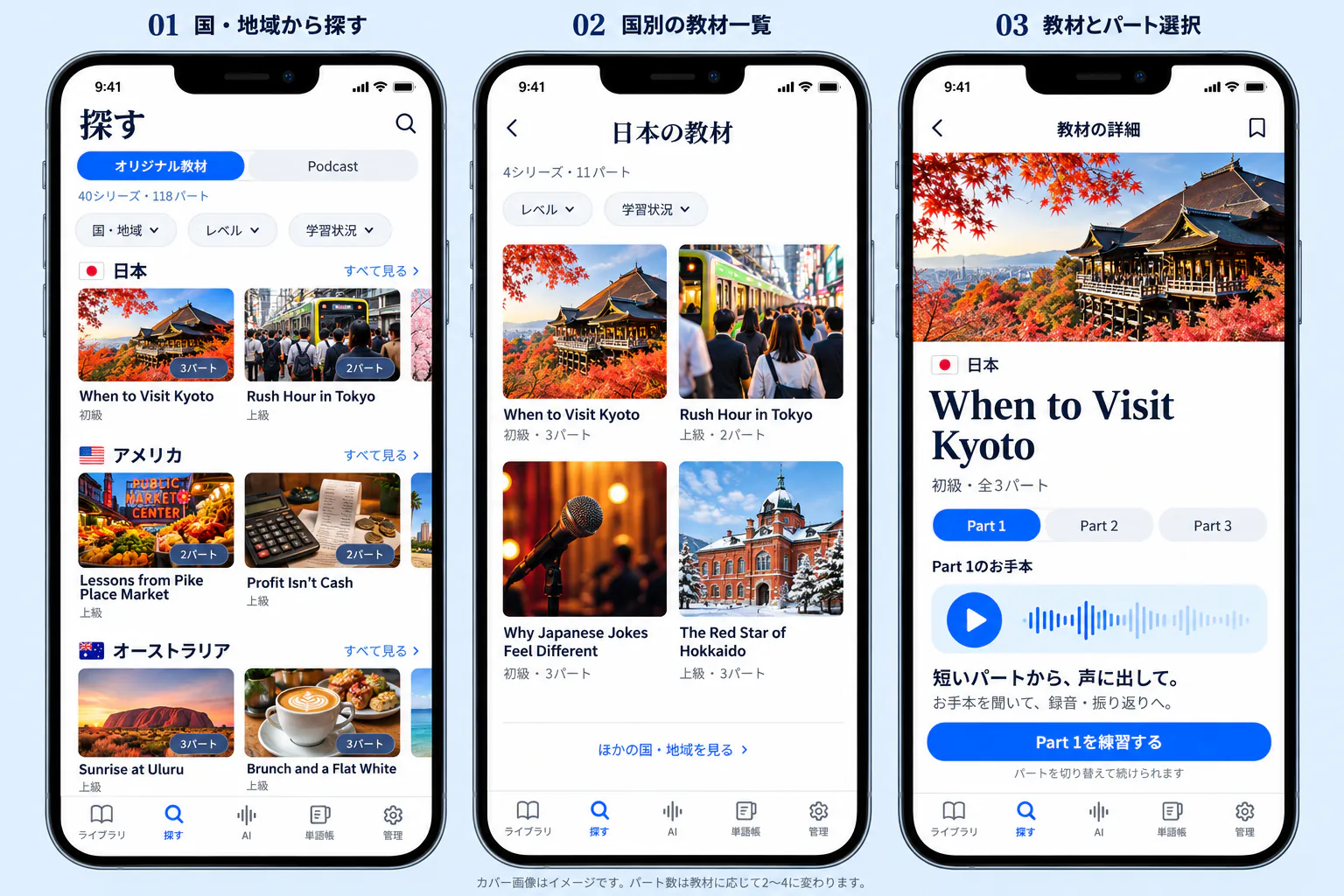
American, British, Indian, Singaporean, Korean… Don't avoid the English you find hard — train your ear on it on purpose. Materials are recorded at natural speed and graded beginner, intermediate or advanced by their measured speaking rate (WPM).
Meetings, interviews, video soundtracks — turn the English you want to understand into a material (web version). Start slow and work up to the real speed.
Choose a focus such as grammar, vocabulary or listening and talk it through in English with an AI teacher. Afterwards the report shows more natural ways to say things and the expressions you used.
Save a word with one click. AI adds the meaning that fits the context and an example sentence.
Materials you create on the web sync to the iPhone app on the same account, so you can shadow and get AI analysis on your commute.
Use the expressions you picked up while shadowing in a class with an AI teacher, and check your progress with the comprehensive test. Both are on the web version and on every plan (how often depends on the plan).
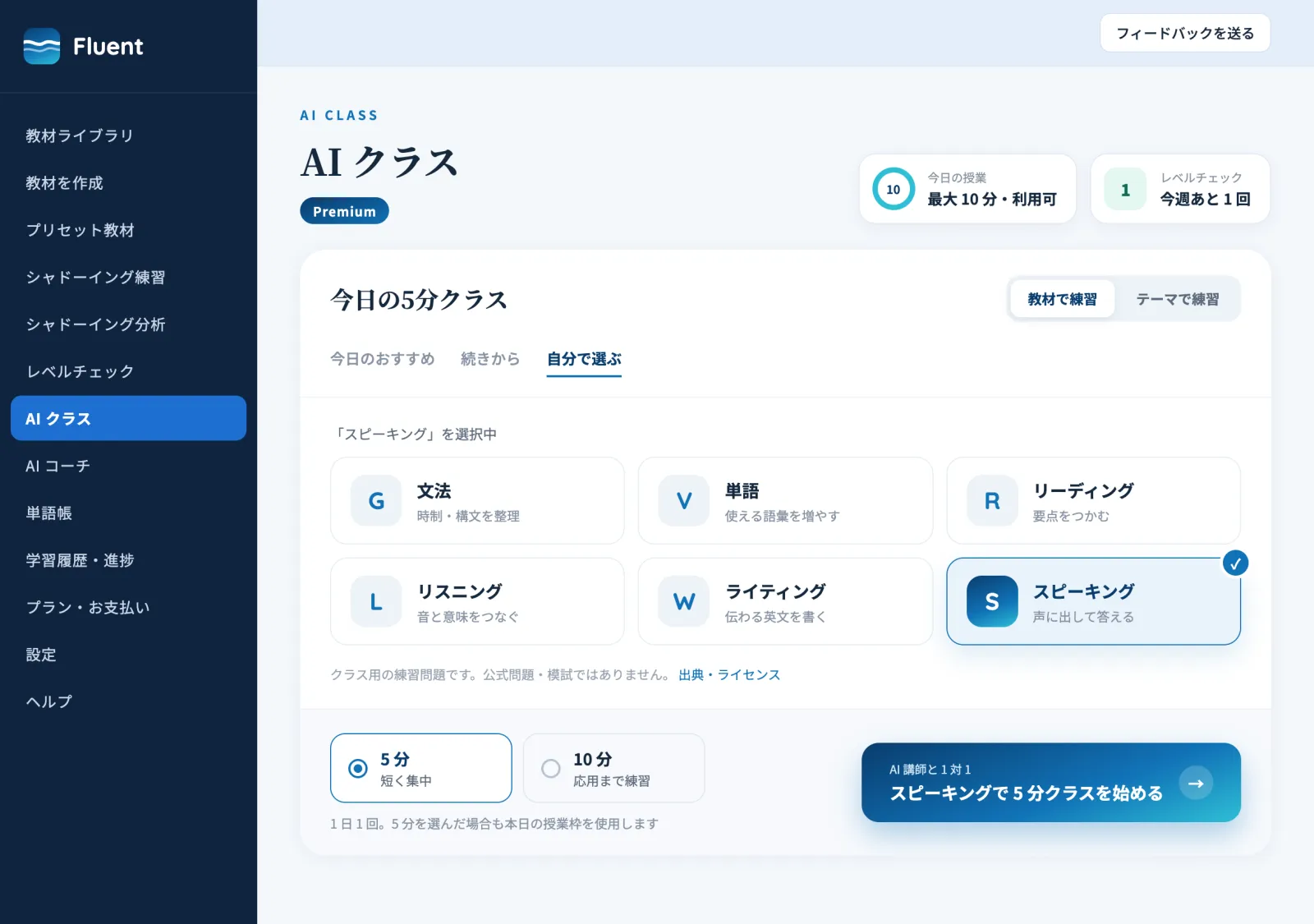
Pick grammar, vocabulary, reading, listening, writing or speaking for today's class. Talk through a theme, or practise with TOEIC- and TOEFL-style questions. You need a microphone.
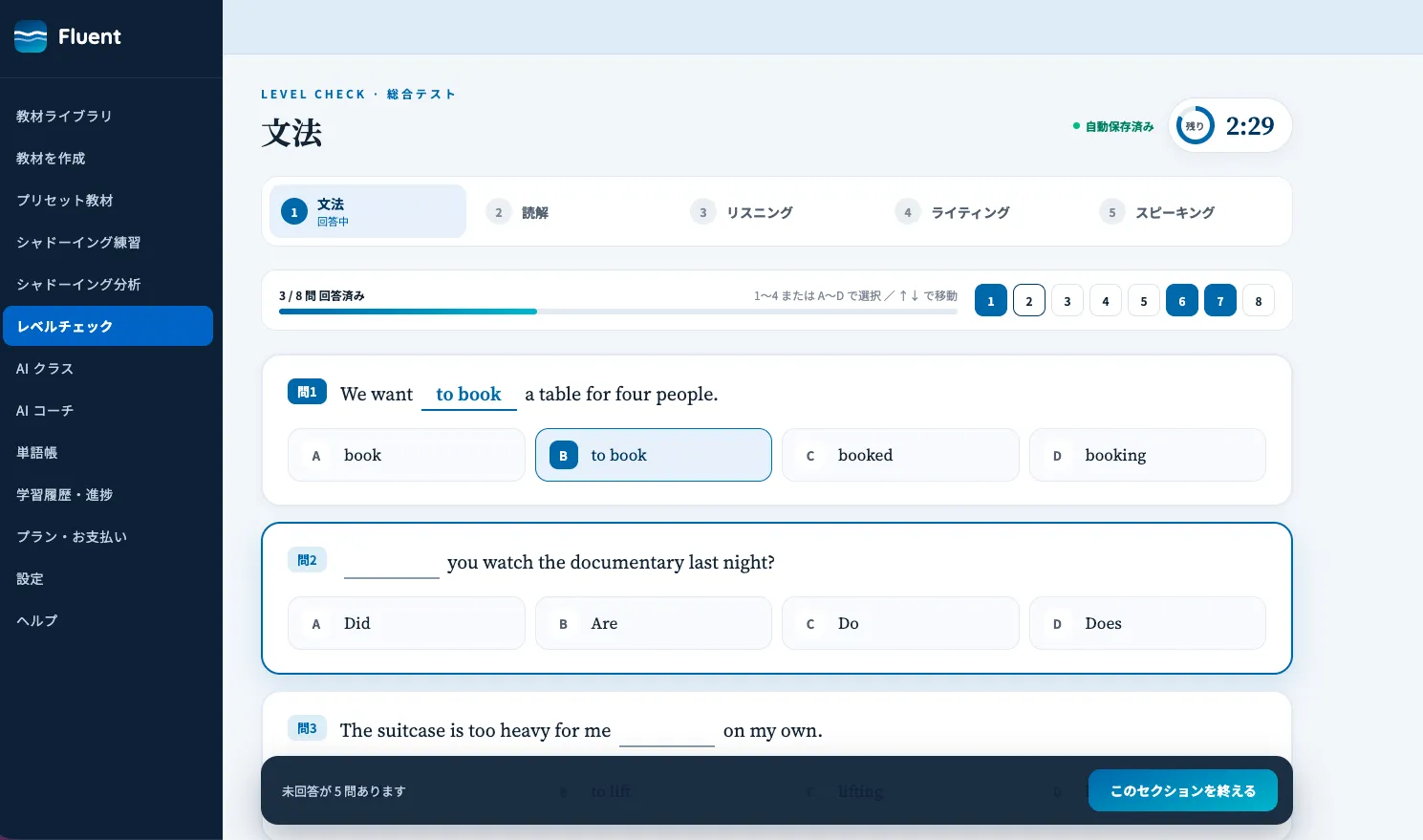
Take the test at the level that fits you, out of nine. Your result is a radar chart of five skills, laid over your last one.
One free trial per account: 7 days of every feature, within the limits below, counted from the day you press start.
For materials and AI feedback first, with a taste of the AI class
Five minutes with the AI teacher, every day
Daily lessons with room for role-play and practice
From goal setting to daily plans and staying on track, with an AI coach
7-day free trial: up to 3 AI classes of 5 min, the AI coach kickoff (20 min) plus up to 15 min of voice coaching, the comprehensive and conversation tests once each (first attempt), and up to 10 AI analyses a day
Every plan comes monthly or yearly (a year costs ten months). You can switch plans at any time; the difference is prorated. The exact price is shown at checkout.
Yes. Start with a beginner-level preset or a clean recording, then raise the level and the accent difficulty as it gets easier. Playback can be slowed down to 0.5×.
mp3, m4a and wav files (up to 30 minutes and 80 MB). One material covers a region of up to 5 minutes. Creating materials from audio is done on the web version.
A private lesson with an AI teacher in English on a focus you choose — grammar, vocabulary, reading, listening, writing or speaking (5 minutes; Pro Plus and Premium can also choose 10). You can also practise with TOEIC- and TOEFL-style questions. Afterwards the report shows more natural ways to say things and the expressions you used. It runs on the web version and needs a microphone.
You choose one of three courses: Quick (grammar, reading, listening — about 20 minutes), Standard (plus writing — about 30 minutes) or Full (plus speaking — about 40 minutes). You get a level for each skill on a nine-step scale from A1 to C2, shown on a chart, with a comparison with your last attempt and suggested practice; your next test is matched to that level. It is a study guide, not an official level or score such as CEFR or TOEIC. The test is taken on the web version on a PC only.
It is part of the Premium plan. It proposes a study plan from your goal and the time you have, and adjusts time and materials in a weekly review. Besides everyday chat, you get 40 minutes of voice coaching per renewal period. During the free trial you can try the kickoff (your first session, 20 min: goal, study plan and materials decided together), the chat and 15 minutes of voice coaching.
Materials, AI analysis, presets, podcast materials, vocabulary and history are the same on every plan. The plans differ in how many AI classes you get and how long they are, how often you can take the comprehensive test and the conversation test, and whether the AI coach is included. You can switch plans at any time; the difference is prorated.
Yes, it is on the App Store. It signs in with the same account as the web version and carries over the materials you created on the web. You can shadow, record, get AI analysis and use the vocabulary book, all in sync (creating materials from audio and the comprehensive test are web-only). The web app also works in your phone's browser.
No. Your audio and recordings are never shown to other users. They are sent to the AI providers we use as processors for transcription and analysis (see the privacy policy for details). You can delete materials and recordings at any time. Privacy Policy
Yes. Cancel whenever you like; you will not be charged after the current period ends. The free trial costs nothing unless you subscribe. If you subscribe during the trial, billing starts when the trial ends (with less than 48 hours of trial left, you are charged when you subscribe).
Every feature free for 7 days from the day you press start. Presets in many accents and AI analysis are included from day one.
Questions about Fluent, business use and partnerships, or press enquiries.